CyRide (a public transit operator in Ames, serving Iowa State University.)
CyRide (a public transit operator in Ames, serving Iowa State University.)
CyRide (a public transit operator in Ames, serving Iowa State University.)
Enhancing CyRide Usability for Smartwatch Platforms
Enhancing CyRide Usability for Smartwatch Platforms
Overview
Overview
Overview
This project focuses on redesigning and enhancing the CyRide functionality within the MyState app, with the ultimate goal of creating a seamless smartwatch application for ISU students and Ames residents. The team aimed to address core usability issues like inaccurate bus schedules, complex navigation, and the lack of modern wearable technology integration.
This project focuses on redesigning and enhancing the CyRide functionality within the MyState app, with the ultimate goal of creating a seamless smartwatch application for ISU students and Ames residents. The team aimed to address core usability issues like inaccurate bus schedules, complex navigation, and the lack of modern wearable technology integration.
Problem Statement and Objective
Problem Statement and Objective
Problem Statement and Objective
The current CyRide feature in the MyState app struggles with:
• Unreliable bus arrival times: Users lose trust in the system due to inconsistencies.
• Confusing navigation: Difficulty determining bus routes or stops, especially for new or infrequent users.
• Cumbersome usage: Existing solutions require frequent interactions with the phone, which is inconvenient for users on the go.
The current CyRide feature in the MyState app struggles with:
• Unreliable bus arrival times: Users lose trust in the system due to inconsistencies.
• Confusing navigation: Difficulty determining bus routes or stops, especially for new or infrequent users.
• Cumbersome usage: Existing solutions require frequent interactions with the phone, which is inconvenient for users on the go.
Role: UX Researcher & UI Designer
Project Duration: 18 weeks
Team Size: 4
Tools Used: Figma, Fig Jam, Miro, Surveys, Affinity Mapping, Balsamiq
Role: UX Researcher & UI Designer
Project Duration: 18 weeks
Team Size: 4
Tools Used: Figma, Fig Jam, Miro, Surveys, Affinity Mapping, Balsamiq
The project proposed a two-phase solution:
1. Enhance the MyState mobile app’s UI/UX to address these issues.
2. Develop a smartwatch-compatible application to offer hands-free, efficient access to critical CyRide functionalities.
The project proposed a two-phase solution:
1. Enhance the MyState mobile app’s UI/UX to address these issues.
2. Develop a smartwatch-compatible application to offer hands-free, efficient access to critical CyRide functionalities.
Implementation Approach
The team employed a systematic design process using user research, prototyping, and iterative evaluations:
The team employed a systematic design process using user research, prototyping, and iterative evaluations:
Phase 1: Requirements Gathering and User Research
Phase 1: Requirements Gathering and User Research
1. Participants:
• Seven users (a mix of smartwatch and non-smartwatch users).
• Target groups included ISU students, faculty, and Ames residents.
2. Methods:
• Conducted semi-structured interviews and questionnaires.
• Mapped user feedback into personas (novice and expert users) and scenarios.
• Identified pain points using affinity diagrams.
1. Participants:
• Seven users (a mix of smartwatch and non-smartwatch users).
• Target groups included ISU students, faculty, and Ames residents.
2. Methods:
• Conducted semi-structured interviews and questionnaires.
• Mapped user feedback into personas (novice and expert users) and scenarios.
• Identified pain points using affinity diagrams.
Key Insights
• Users desired real-time notifications and simplified navigation for bus schedules.
• Frequent requests included saving favorite routes and receiving push notifications about bus arrivals.
• Regular users focused on consistency and speed, while occasional users wanted intuitive onboarding.
• Users desired real-time notifications and simplified navigation for bus schedules.
• Frequent requests included saving favorite routes and receiving push notifications about bus arrivals.
• Regular users focused on consistency and speed, while occasional users wanted intuitive onboarding.


Phase 2: Prototyping and Evaluation
Phase 2: Prototyping and Evaluation
Design Goals:
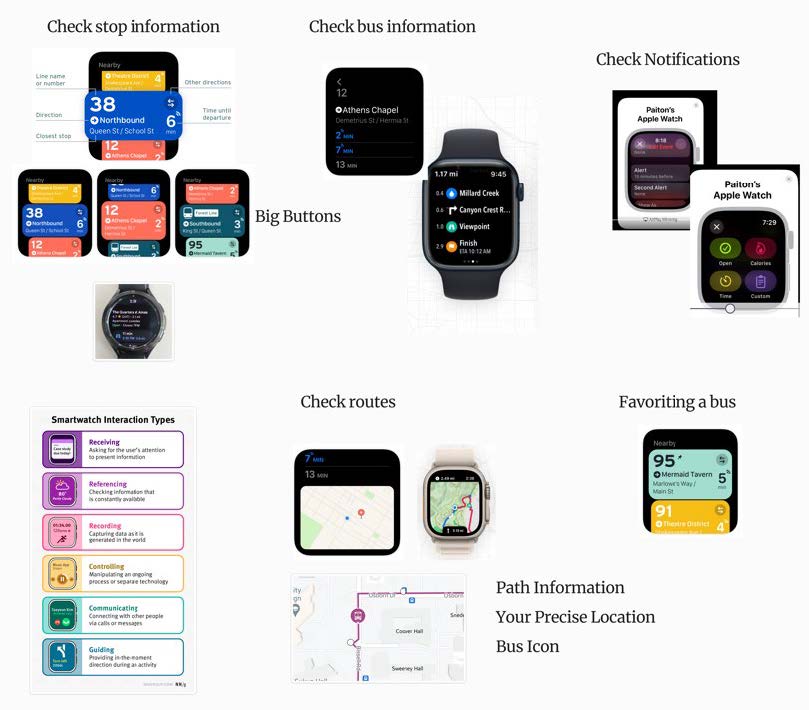
1. Simplify task flows for core functionalities:
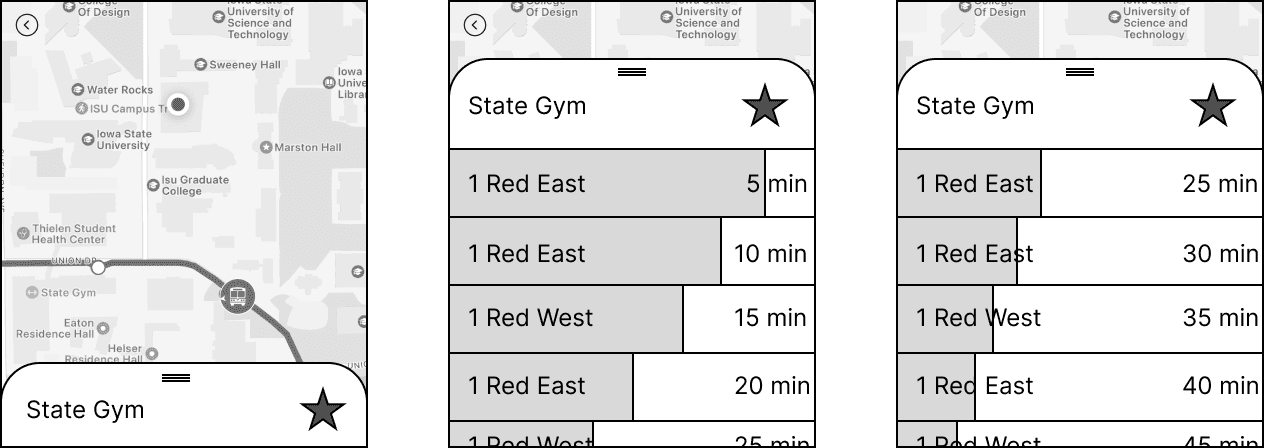
• Check bus routes and stop information.
• Monitor bus activity and schedules.
• Save and prioritize favorite routes.
• Enable real-time push notifications.
2. Ensure consistency with the mobile app while leveraging smartwatch-specific interactions (e.g., scrolling, tapping).
Prototyping:
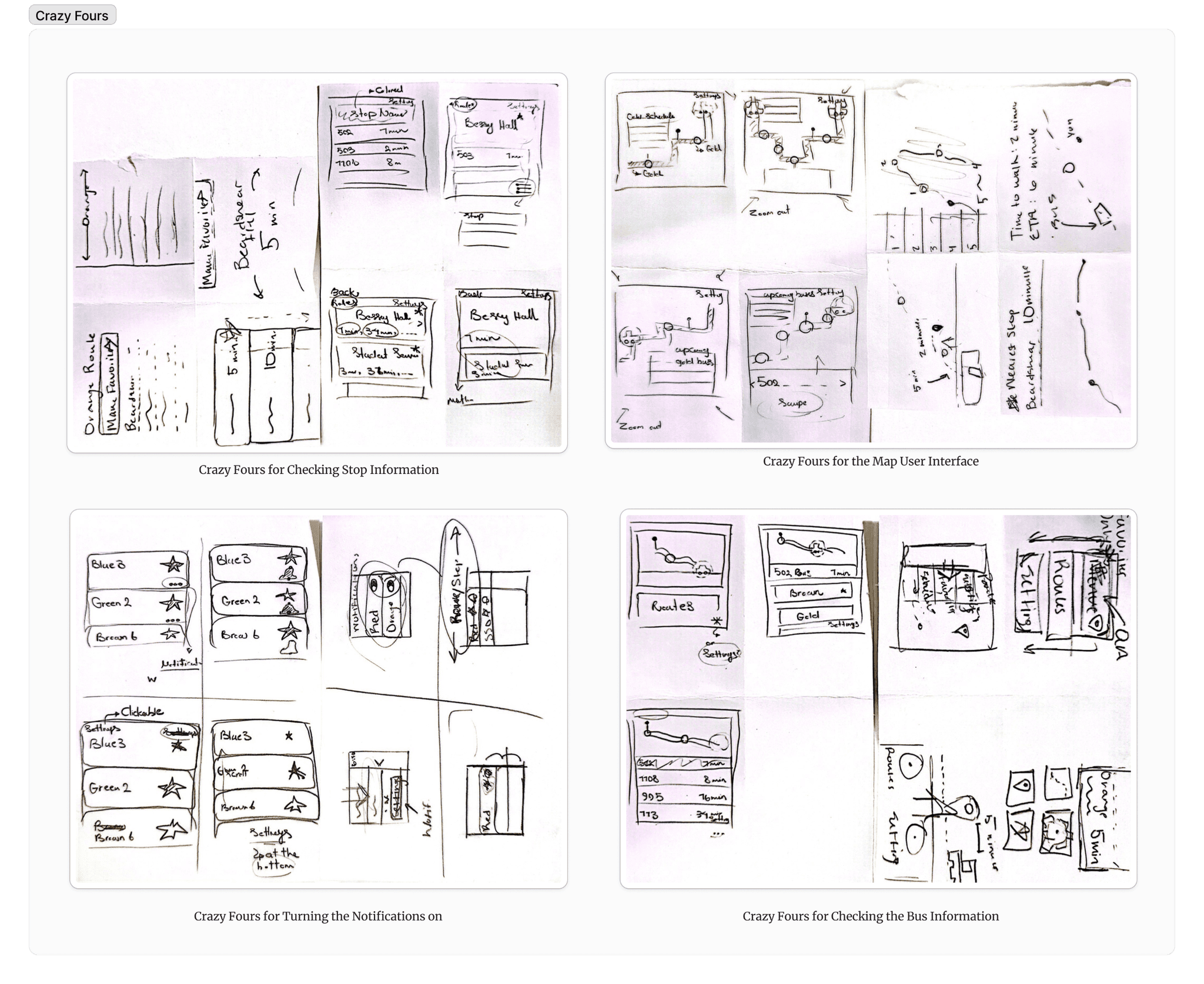
1. Paper Prototypes:
• Used Crazy Fours ideation to explore concepts quickly.
• Focused on the Apple Watch as the initial smartwatch platform.
2. Digital Prototypes:
• Transitioned to mid and high-fidelity designs using Figma.
• Incorporated user feedback to streamline task flows and ensure visual consistency.
Evaluation:
1. Conducted cognitive walkthroughs and heuristic evaluations.
2. Key issues addressed:
• Complex task flows (e.g., notifications required too many steps).
• Inadequate feedback (users were unsure if tasks like favoriting routes were completed).
• Inconsistent interactions (differences between mobile and smartwatch versions).
Design Goals:
1. Simplify task flows for core functionalities:
• Check bus routes and stop information.
• Monitor bus activity and schedules.
• Save and prioritize favorite routes.
• Enable real-time push notifications.
2. Ensure consistency with the mobile app while leveraging smartwatch-specific interactions (e.g., scrolling, tapping).
Prototyping:
1. Paper Prototypes:
• Used Crazy Fours ideation to explore concepts quickly.
• Focused on the Apple Watch as the initial smartwatch platform.
2. Digital Prototypes:
• Transitioned to mid and high-fidelity designs using Figma.
• Incorporated user feedback to streamline task flows and ensure visual consistency.
Evaluation:
1. Conducted cognitive walkthroughs and heuristic evaluations.
2. Key issues addressed:
• Complex task flows (e.g., notifications required too many steps).
• Inadequate feedback (users were unsure if tasks like favoriting routes were completed).
• Inconsistent interactions (differences between mobile and smartwatch versions).

Final Deliverables
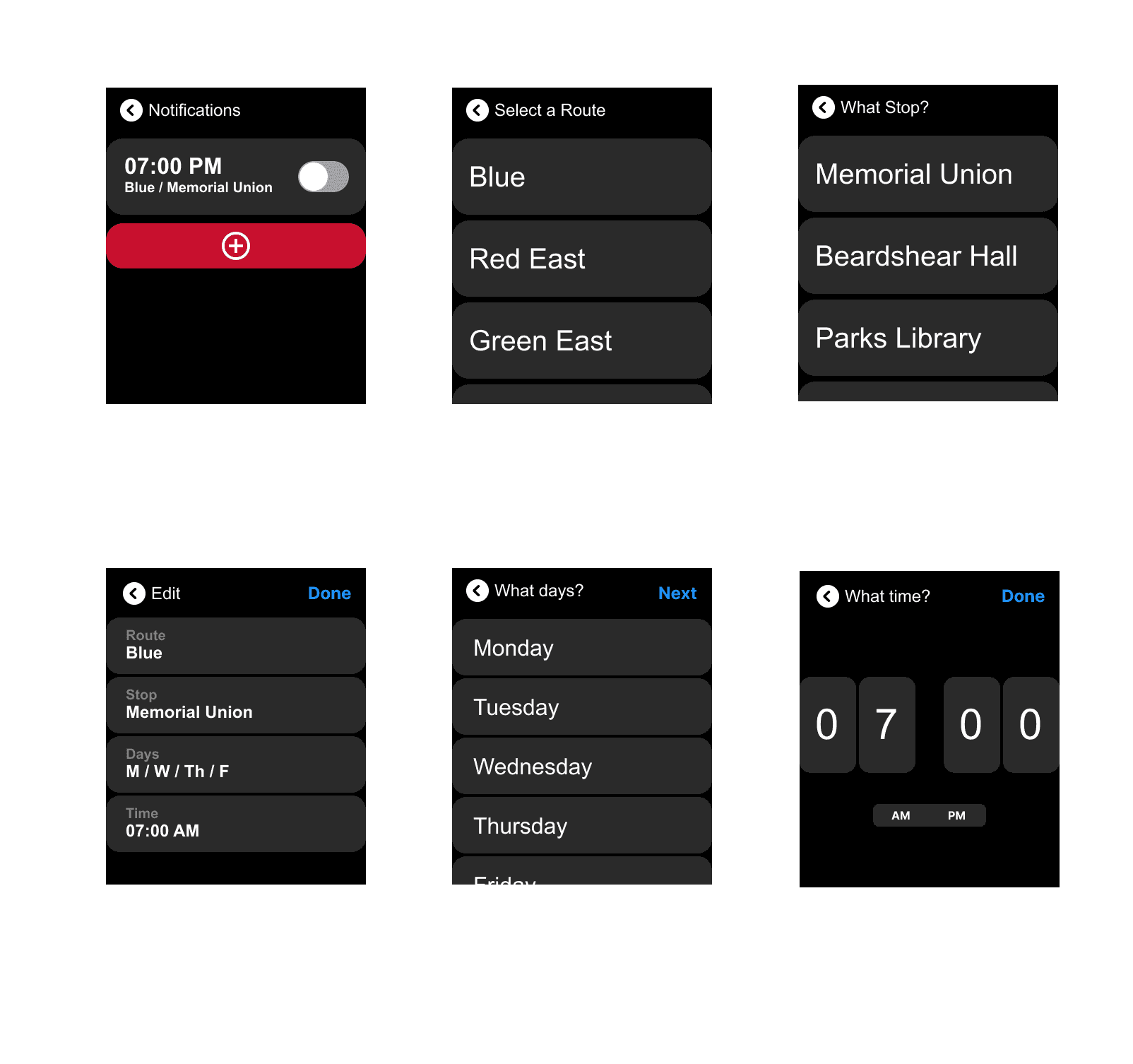
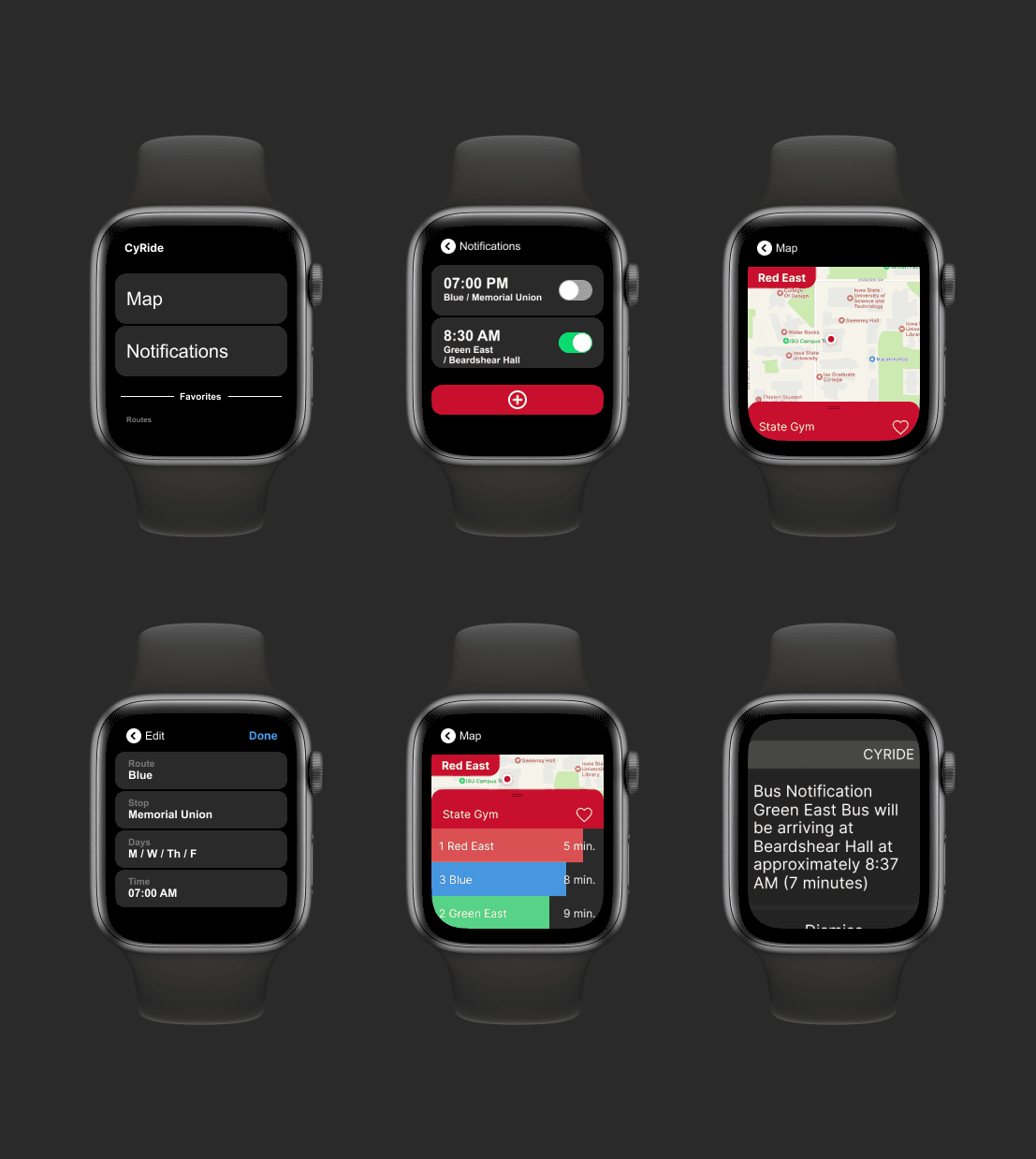
Smartwatch App Features:
• Real-Time Notifications: Alerts users about bus schedules and delays.
• Favorite Routes: Quickly access preferred bus routes with prioritized updates.
• Stop Information: Show nearest stops, upcoming buses, and real-time arrival times.
• Route Navigation: Display map-based navigation for better route planning.
Evaluation Results:
• The smartwatch app improved completion times and user satisfaction compared to the MyState app and baseline solutions (e.g., Apple Watch Reminders).
• Reduced mental workload for tasks like checking bus schedules and favoriting stops.
Limitations:
• Small participant pool (4 frequent users for high-fidelity evaluation).
• Testing on tablets mimicking smartwatches limited the realism of the user experience.
Smartwatch App Features:
• Real-Time Notifications: Alerts users about bus schedules and delays.
• Favorite Routes: Quickly access preferred bus routes with prioritized updates.
• Stop Information: Show nearest stops, upcoming buses, and real-time arrival times.
• Route Navigation: Display map-based navigation for better route planning.
Evaluation Results:
• The smartwatch app improved completion times and user satisfaction compared to the MyState app and baseline solutions (e.g., Apple Watch Reminders).
• Reduced mental workload for tasks like checking bus schedules and favoriting stops.
Limitations:
• Small participant pool (4 frequent users for high-fidelity evaluation).
• Testing on tablets mimicking smartwatches limited the realism of the user experience.